 WonksAnonymous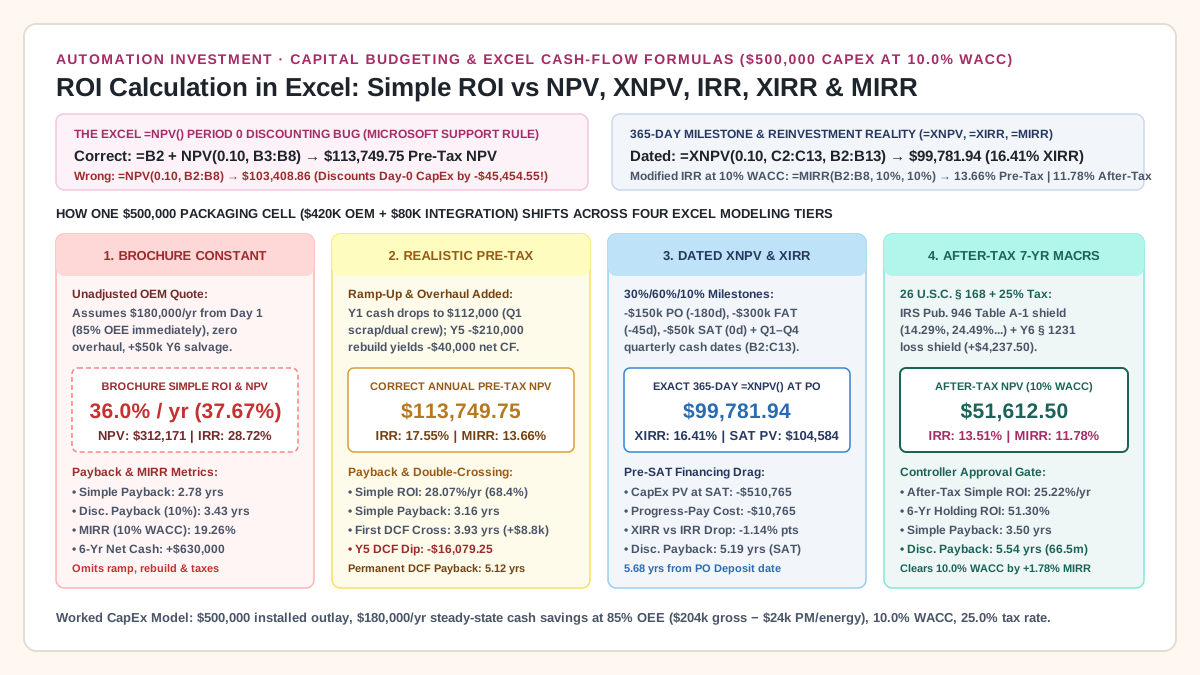
ROI Calculation in Excel: Simple ROI, Discounted Payback, NPV, XNPV, IRR, and MIRR for Equipment CapEx
Compare simple ROI calculation in Excel against NPV, XNPV, IRR, XIRR, and MIRR formulas when equipment CapEx has milestone deposits, Q1 ramp-up scrap, and a Year 5 overhaul.
Updated October 25, 2026.
Including the Period 0 equipment outlay inside Excel’s =NPV(rate, B2:B8) function or quoting an unadjusted vendor simple ROI causes industrial CapEx proposals to fail controller audit when commissioning scrap, rework, and overhaul downtime hit the plant floor. An accurate ROI calculation in Excel requires separating non-discounted accounting averages (=AVERAGE(B3:B8)/ABS(B2)) and holding-period net ratios (=(SUM(B3:B8)+B2)/ABS(B2)) from time-weighted capital budgeting functions that keep Period 0 CapEx outside =NPV() (=B2+NPV($B$1, B3:B8)), anchor pre-installation milestone payments on a 365-day calendar (=XNPV($B$1, C2:C13, B2:B13) and =XIRR(C2:C13, B2:B13)), and compound interim cash inflows at the corporate hurdle rate (=MIRR(B2:B8, $B$1, $B$1)). On a $500,000 automated packaging line with a 10.00% WACC, incorporating a 30%/60%/10% PO/FAT/SAT deposit schedule, a -$68,000 Year 1 Q1/Q2 OEE ramp-up cash shortfall, a -$210,000 Year 5 major overhaul, and 25.00% income taxes with 7-year MACRS depreciation compresses a 36.00% vendor brochure simple ROI ($312,170.62 NPV, 28.72% IRR, 2.78-year simple payback) to $113,749.75 in annual pre-tax NPV (17.55% IRR, 13.66% MIRR, 5.12-year permanent discounted payback), $99,781.94 in dated =XNPV() at the PO date (16.41% XIRR), and $51,612.50 in after-tax MACRS NPV (13.51% after-tax IRR, 11.78% after-tax MIRR, 5.54-year discounted payback).
ROI calculation in Excel: 7 CapEx cash flow formulas compared on one $500,000 machine
When engineering and finance teams search for an ROI calculation in Excel, the phrase covers seven distinct spreadsheet formulas that answer different capital-allocation questions. Using the baseline definitions in Automation Payback, ROI and TCO and the row-by-row structure in Build a Multi-Year Equipment Cash-Flow Model in Excel, the table below maps each metric to its exact Excel formula syntax, mathematical equation, and controller audit rule.
In every annual formula below, cell B1 holds the corporate Weighted Average Cost of Capital (WACC = 10.00%), cell B2 holds the Period 0 installed capital outlay (-$500,000.00), and cells B3:B8 hold the net cash flows for Operating Years 1 through 6. In the dated schedule, cells B2:B13 hold exact ISO calendar dates (YYYY-MM-DD) and cells C2:C13 hold the corresponding dated cash flows.
Scroll horizontally to see all columns.
| Capital Budgeting Metric | Exact Excel Formula Syntax | Algebraic Definition | Quirk & Controller Audit Rule |
|---|---|---|---|
| 1. Simple Annualized Accounting ROI | =AVERAGE(B3:B8)/ABS(B2) |
ROI_annual = [(1 / N) * sum_{t=1..N} CF_t] / ABS(CF_0) |
Treats Year 1 ramp-up losses, Year 5 overhaul dips, and Year 6 salvage as an unweighted average and ignores recovery of the $500,000 principal (28.07%/yr realistic pre-tax vs 36.00%/yr ex-salvage brochure). |
| 2. Cumulative Multi-Year Simple ROI | =(SUM(B3:B8)+B2)/ABS(B2) |
ROI_total = (sum_{t=1..N} CF_t - ABS(CF_0)) / ABS(CF_0) |
Because B2 is stored as -500000, add +B2 in the numerator; typing -B2 double-counts CapEx and inflates ROI by +200 percentage points. Always state the horizon N = 6 years (68.40% pre-tax; 51.30% after-tax). |
| 3. Simple & Discounted Payback Period | =LOOKUP(2,1/(E2:E8<0),A2:A8)+ABS(LOOKUP(2,1/(E2:E8<0),E2:E8))/INDEX(D2:D8,MATCH(2,1/(E2:E8<0),1)+1) |
DPB = t_last_neg + ABS(CumDCF_{t_last_neg}) / DCF_{t_last_neg+1} |
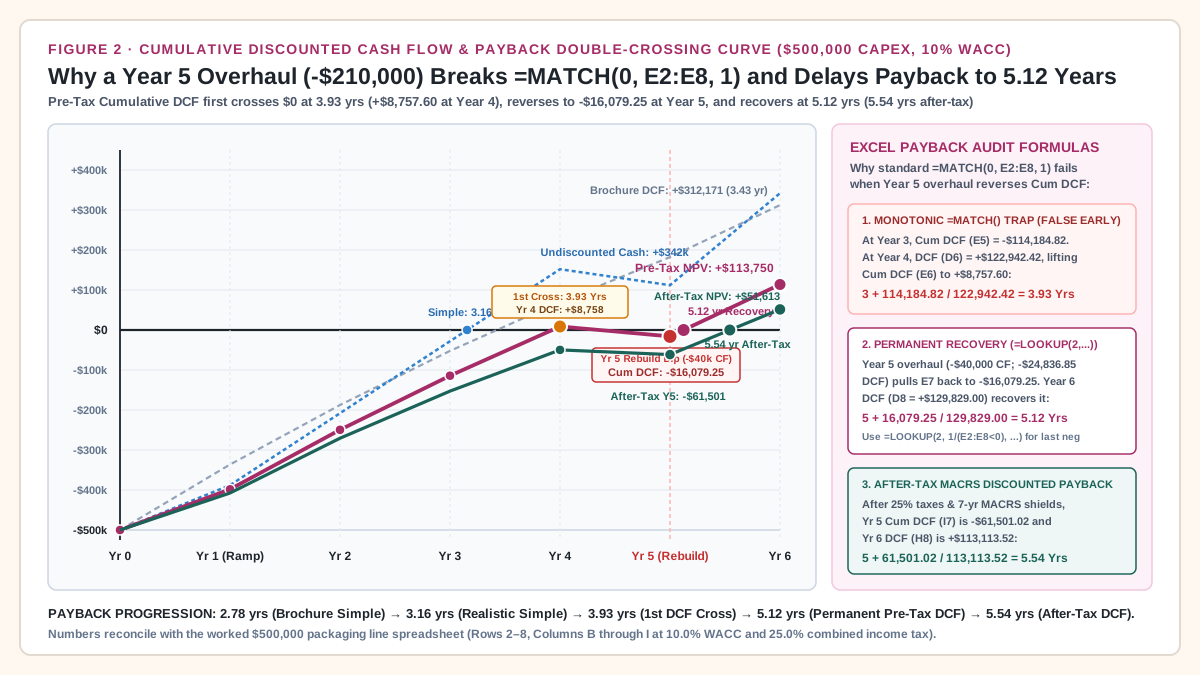
Standard =MATCH(0, E2:E8, 1) fails when a Year 5 overhaul dips Cumulative DCF (E2:E8) back below zero (+$8,757.60 at Yr 4 -> -$16,079.25 at Yr 5), reporting a false 3.93-year crossover instead of 5.12 years. |
4. Net Present Value (NPV) — Period 0 Outside |
=B2+NPV($B$1, B3:B8) |
NPV = CF_0 + sum_{t=1..N} [CF_t / (1 + r)^t] |
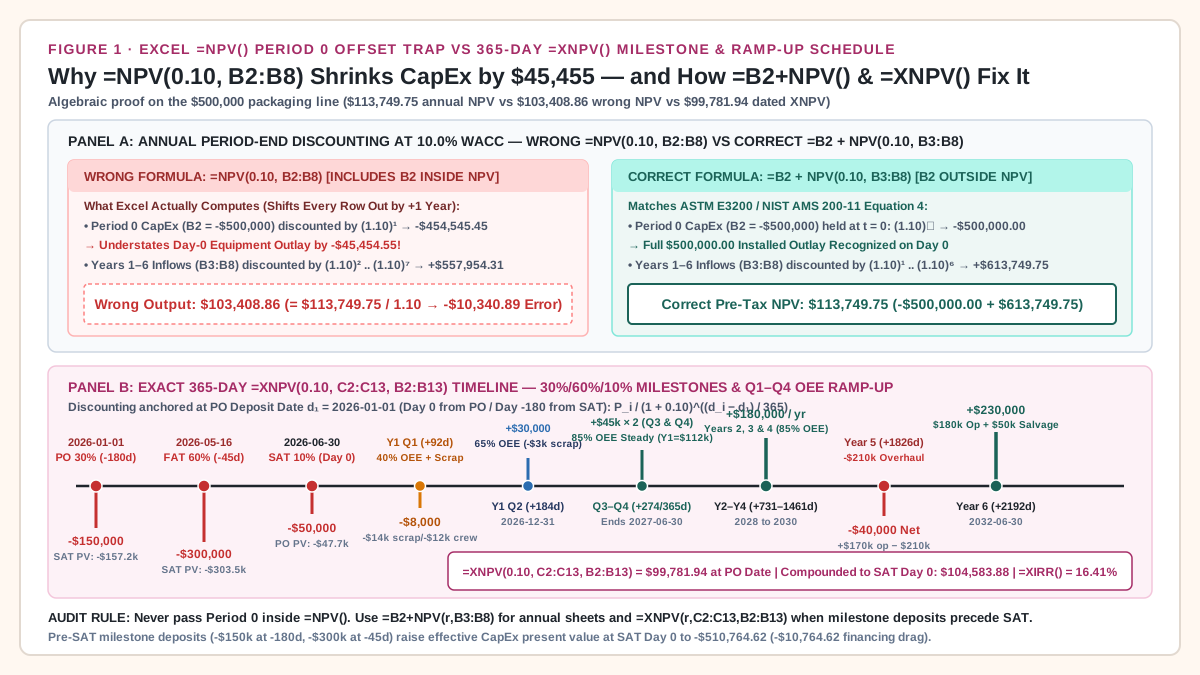
Never write =NPV($B$1, B2:B8): Excel discounts the first argument inside =NPV() by (1+r)^1, understating Day-0 CapEx by $45,454.55 and shrinking total NPV by 1 / (1 + r) ($103,408.86 vs $113,749.75). |
5. Exact-Date Net Present Value (XNPV) |
=XNPV($B$1, C2:C13, B2:B13) |
XNPV = sum_{i=1..M} [CF_i / (1 + r)^((d_i - d_1)/365)] |
Unlike =NPV(), =XNPV() includes the first cash flow C2 at d_1 (d_1 - d_1 = 0 days, PO deposit date). Multiply by (1+r)^((d_SAT - d_PO)/365) to restate PO-date XNPV ($99,781.94) in SAT Day-0 dollars ($104,583.88). |
6. Periodic & Dated Internal Rate of Return (IRR / XIRR) |
=IRR(B2:B8) and =XIRR(C2:C13, B2:B13) |
Solves NPV(IRR) = 0 (periodic) or XNPV(XIRR) = 0 (365-day) |
Assumes all interim positive cash inflows are reinvested at the solved IRR itself (17.55% pre-tax; 16.41% XIRR; 28.72% brochure) rather than corporate WACC (10.00%), overstating achievable compound return. |
7. Modified Internal Rate of Return (MIRR) |
=MIRR(B2:B8, $B$1, $B$1) |
MIRR = [-FV(r_reinv, pos_CFs) / PV(r_fin, neg_CFs)]^(1/N) - 1 |
Discounts the Year 5 -$40,000 overhaul cash deficit back to t = 0 at r_fin = 10% and compounds positive inflows to Year 6 at r_reinv = 10%, yielding a unique 13.66% pre-tax (11.78% after-tax) return. |
Four-tier progressive model comparison on a $500,000 packaging line
To see how npv vs simple roi automation metrics diverge on a real industrial project, follow one $500,000 automated high-speed case packer and robotic palletizer cell ($420,000 OEM machine invoice plus $80,000 in freight, rigging, safety guarding, conveyor/checkweigher controls integration, and Site Acceptance Testing, as itemized in The True Installed Cost of Packaging Automation) across four progressive modeling tiers at a 10.00% corporate WACC over a 6-year operating horizon ($50,000 terminal salvage value at Year 6).
Worked example. Replace each input with a quote or a measured figure from the plant before using the result.
Scroll horizontally to see all columns.
| Model Tier & Cash-Flow Scope | Total Inflows (Y1–Y6) |
Net Cash (Y0–Y6) |
Simple Annual ROI | 6-Yr Holding Simple ROI | Simple Payback | Discounted Payback (10%) |
Correct NPV or XNPV (10%) |
Wrong =NPV(10%, B2:B8) Trap |
=IRR() or =XIRR() |
=MIRR() at 10% WACC |
|---|---|---|---|---|---|---|---|---|---|---|
1. Brochure Constant Pre-Tax ($180k/yr steady from Day 1 + $50k Y6 salvage) |
$1,130,000.00 |
$630,000.00 |
36.00% ex-salvage (37.67% w/ salv.) |
116.00% ex-salv. (126.00% w/ salv.) |
2.78 yrs (33.3 mos) |
3.43 yrs (41.1 mos) |
$312,170.62 |
$283,791.47 (-$28,379.15 error) |
28.72% |
19.26% |
2. Realistic Annual Pre-Tax (Y1 ramp $112k + Y5 overhaul -$40k net) |
$842,000.00 |
$342,000.00 |
28.07% |
68.40% |
3.16 yrs (37.9 mos) |
5.12 yrs (3.93 yr 1st cross) |
$113,749.75 |
$103,408.86 (-$10,340.89 error) |
17.55% |
13.66% |
3. Dated Milestone & Quarterly Pre-Tax (30%/60%/10% CapEx + Q1–Q4 ramp, 365-day) |
$842,000.00 |
$342,000.00 |
28.07% |
68.40% |
3.16 yrs from SAT (3.65 PO) |
5.19 yrs from SAT (5.68 PO) |
$99,781.94 at PO ($104,583.88 SAT) |
N/A (XNPV anchors d_1 = 0) |
16.41% (XIRR) |
13.38% (dated equiv.) |
4. Realistic Annual After-Tax (7-Yr MACRS Table A-1 + 25% tax + § 1231 shield) |
$756,500.00 |
$256,500.00 |
25.22% |
51.30% |
3.50 yrs (42.0 mos) |
5.54 yrs (66.5 mos) |
$51,612.50 |
$46,920.46 (-$4,692.05 error) |
13.51% |
11.78% |
Takeaway: Moving from an unadjusted vendor brochure (36.00% simple ROI, $312,170.62 NPV, 2.78-year payback) to an after-tax MACRS cash-flow sheet ($51,612.50 NPV, 11.78% MIRR, 5.54-year discounted payback) eliminates $260,558.12 in overstated present value while proving the project still clears the 10.00% WACC hurdle.
Why Excel’s =NPV() function distorts Period 0 CapEx (and how =B2+NPV(r,B3:B8) fixes it)
The single most common formula bug in corporate capital budgeting spreadsheets occurs when an analyst drags the =NPV() range across the entire cash-flow column, including the Period 0 capital outlay in cell B2.
As documented in Microsoft Support’s NPV function reference, Excel’s =NPV(rate, value1, [value2], ...) assumes the investment begins one full period before the date of the value1 cash flow, and discounts value1 by (1 + rate)^1. By contrast, standard engineering economics—codified in Equation 4 of NIST AMS 200-11: Guide for Environmentally Sustainable Investment Analysis Based on ASTM E3200 and OpenStax Principles of Managerial Accounting, Section 11.4—places the initial capital expenditure CF_0 at t = 0 with discount factor (1 + r)^0 = 1.0000:
Correct_NPV = CF_0 + sum_{t=1..N} [ CF_t / (1 + r)^t ]
            = B2 + NPV(r, B3:B8)

Wrong_Excel_NPV(r, B2:B8) = sum_{t=0..N} [ CF_t / (1 + r)^(t + 1) ]
                          = [ CF_0 / (1 + r)^1 ] + sum_{t=1..N} [ CF_t / (1 + r)^(t + 1) ]
                          = Correct_NPV / (1 + r)
Exact dollar distortion on the $500,000 packaging line at 10.00% WACC
When you enter =NPV(0.10, B2:B8) on our realistic pre-tax stream (B2 = -$500,000.00, B3:B8 = +$112k, +$180k, +$180k, +$180k, -$40k, +$230k), two compounding discounting errors occur simultaneously:
- Day-0 CapEx Understatement (
+$45,454.55error): Excel divides the-$500,000.00Day-0 equipment cost by1.10^1, treating the initial check as if it cost only-$454,545.45in present-value terms:Discounted_B2_Error = (-$500,000.00 / 1.10) - (-$500,000.00) = -$454,545.45 - (-$500,000.00) = +$45,454.55 understatement of CapEx - Future Inflow Shift (
-$55,795.43error): Excel pushes the Operating Years1through6cash flows (B3:B8) out to discount exponentst = 2throught = 7, shrinking their combined present value from+$613,749.75(=NPV(0.10, B3:B8)) to+$613,749.75 / 1.10 = +$557,954.31:Correct_PreTax_NPV = -$500,000.00 + $613,749.75 = +$113,749.75 [=B2 + NPV(0.10, B3:B8)] Wrong_PreTax_NPV = -$454,545.45 + $557,954.31 = +$103,408.86 [=NPV(0.10, B2:B8)] Net_NPV_Distortion = $103,408.86 - $113,749.75 = -$10,340.89 (-9.09% = -1 / 1.10)
Notice the trap inside this bug: if a spreadsheet author puts B2 inside =NPV() and forgets to shift B3:B8 (or discounts B2 in a manual PV column while leaving B3:B8 at exponents 1..6), the spreadsheet inflates project NPV by the full +$45,454.55 (reporting $159,204.30 instead of $113,749.75). Keeping B2 outside =NPV($B$1, B3:B8) prevents both errors.
Complete copyable annual Excel worksheet layout (Cells A1:I8)
Set up your annual CapEx worksheet with control parameters in Row 1 (B1 = 0.10 for 10.00% WACC; D1 = 0.25 for 25.00% combined marginal income tax rate) and Period 0 through Year 6 in Rows 2 through 8. Every cell across Columns B through I reconciles to the penny.
Worked example. Replace each input with a quote or a measured figure from the plant before using the result.
Scroll horizontally to see all columns.
| Excel Row | Col A: Period (t) |
Col B: Pre-Tax Net CF (CF_t) |
Col C: Cum Pre-Tax CF (=C_prev+B_t) |
Col D: Pre-Tax DCF (=B_t/(1+$B$1)^A_t) |
Col E: Cum Pre-Tax DCF (=E_prev+D_t) |
Col F: After-Tax Net CF (ATCF_t) |
Col G: Cum After-Tax CF | Col H: After-Tax DCF (=F_t/(1+$B$1)^A_t) |
Col I: Cum After-Tax DCF (=I_prev+H_t) |
|---|---|---|---|---|---|---|---|---|---|
Row 2 (2026-06-30) |
0 |
-$500,000.00 |
-$500,000.00 |
-$500,000.00 |
-$500,000.00 |
-$500,000.00 |
-$500,000.00 |
-$500,000.00 |
-$500,000.00 |
Row 3 (2027-06-30) |
1 |
$112,000.00 |
-$388,000.00 |
$101,818.18 |
-$398,181.82 |
$101,862.50 |
-$398,137.50 |
$92,602.27 |
-$407,397.73 |
Row 4 (2028-06-30) |
2 |
$180,000.00 |
-$208,000.00 |
$148,760.33 |
-$249,421.49 |
$165,612.50 |
-$232,525.00 |
$136,869.83 |
-$270,527.89 |
Row 5 (2029-06-30) |
3 |
$180,000.00 |
-$28,000.00 |
$135,236.66 |
-$114,184.82 |
$156,862.50 |
-$75,662.50 |
$117,853.12 |
-$152,674.77 |
Row 6 (2030-06-30) |
4 |
$180,000.00 |
$152,000.00 |
$122,942.42 |
$8,757.60 |
$150,612.50 |
$74,950.00 |
$102,870.36 |
-$49,804.41 |
Row 7 (2031-06-30) |
5 |
-$40,000.00 |
$112,000.00 |
-$24,836.85 |
-$16,079.25 |
-$18,837.50 |
$56,112.50 |
-$11,696.61 |
-$61,501.02 |
Row 8 (2032-06-30) |
6 |
$230,000.00 |
$342,000.00 |
$129,829.00 |
$113,749.75 |
$200,387.50 |
$256,500.00 |
$113,113.52 |
$51,612.50 |
| Check / Summary Formula | SUM / NPV |
=SUM(B3:B8) -> $842,000.00 |
=SUM(B2:B8) -> $342,000.00 |
=NPV(B1,B3:B8) -> $613,749.75 |
=B2+NPV(B1,B3:B8) -> $113,749.75 |
=SUM(F3:F8) -> $756,500.00 |
=SUM(F2:F8) -> $256,500.00 |
=NPV(B1,F3:F8) -> $551,612.50 |
=F2+NPV(B1,F3:F8) -> $51,612.50 |
Notice the built-in self-audit at the bottom of the sheet:
- Pre-Tax Cumulative DCF ending cell (
E8) equals=SUM(D2:D8)=$113,749.75, which matches=B2+NPV($B$1, B3:B8)to the penny. - After-Tax Cumulative DCF ending cell (
I8) equals=SUM(H2:H8)=$51,612.50, which matches=F2+NPV($B$1, F3:F8)to the penny.
Takeaway: Always keep Period 0 CapEx (B2) outside =NPV($B$1, B3:B8) and verify that your formula output equals the final cell of the Cumulative Discounted Cash Flow column (E8 = $113,749.75 pre-tax; I8 = $51,612.50 after-tax).
Modeling Q1/Q2 OEE ramp-up scrap and milestone progress payments with =XNPV() and =XIRR()
Annual period-end discounting (=B2+NPV($B$1, B3:B8)) makes two simplifying timing assumptions that rarely hold on custom packaging machinery: first, that all $500,000 of CapEx leaves the bank on the exact day production starts (SAT Day 0); and second, that Year 1 cash inflows arrive in a single lump sum 365 days later.
In practice, industrial OEMs bill custom automation across three commercial milestones—30% Deposit at Purchase Order (PO), 60% Progress Payment at Factory Acceptance Testing (FAT / shipment), and 10% Holdback at Site Acceptance Testing (SAT)—meaning 90% ($450,000) of the capital is tied up months before the line packs its first sellable case. Once commissioned, the machine goes through a quarterly Overall Equipment Effectiveness (OEE) ramp-up curve before reaching steady state.
Quarterly Year 1 OEE ramp-up bridge ($112,000 actual vs $180,000 brochure)
In our baseline model, steady-state operation at 85.0% OEE generates $204,000/year ($51,000/quarter, or $600.00 per OEE percentage point per quarter) in gross cash labor and material savings—verified using the payroll-stop test in Labor Savings Versus Redeployment and the regime bridge in Overall Equipment Effectiveness Formula, Calculator, and the OEE Financial Bridge—minus -$24,000/year (-$6,000/quarter) in new preventive maintenance spares, servo power, and compressed air, yielding $180,000/year ($45,000/quarter) in steady-state net pre-tax operating cash flow.
During Year 1 (2026-06-30 to 2027-06-30), startup losses reduce cash flow across the first two quarters:
- Y1 Q1 (
2026-09-30,+92days after SAT —40%OEE Realization):- Gross Operating Savings (
40%OEE):40 × $600.00 = +$24,000.00(47.06%of the$51,000steady-state quarterly gross rate). - New Maintenance & Energy:
-$6,000.00. - Commissioning Scrap & Rework:
-$14,000.00in crushed corrugated cases, film rollstock, and damaged product during jam-clearing and photo-eye timing adjustments (priced per Cost per Good Pack). - Dual-Crew Parallel Run Labor:
-$12,000.00because plant management retains the manual packing crew on the floor for6weeks post-SAT to protect customer shipments during stabilization. - Net Y1 Q1 Cash Flow:
+$24,000 - $6,000 - $14,000 - $12,000=-$8,000.00(a net cash drain in the first 90 days, as tracked in The 90-Day Post-Installation Review).
- Gross Operating Savings (
- Y1 Q2 (
2026-12-31,+184days after SAT —65%OEE Realization):- Gross Operating Savings (
65%OEE):65 × $600.00 = +$39,000.00(76.47%of target). - New Maintenance & Energy:
-$6,000.00. - Residual Tuning Scrap:
-$3,000.00; manual parallel crew is fully stopped ($0). - Net Y1 Q2 Cash Flow:
+$39,000 - $6,000 - $3,000=+$30,000.00.
- Gross Operating Savings (
- Y1 Q3 (
2027-03-31,+274days) & Y1 Q4 (2027-06-30,+365days —85%OEE Target Reached):- Each quarter achieves full steady state:
+$51,000gross savings minus-$6,000running cost =+$45,000.00/quarter.
- Each quarter achieves full steady state:
- Total Year 1 Pre-Tax Operating Cash Flow:
Year_1_CF = (-$8,000) + $30,000 + $45,000 + $45,000 = +$112,000.00
Ramp_Up_Shortfall_vs_Brochure = $112,000.00 - $180,000.00 = -$68,000.00 in Year 1
Exact 365-day =XNPV() and =XIRR() schedule (Cells B2:C13)
As defined in Microsoft Support’s XNPV function and XIRR function, Excel discounts irregularly dated cash flows using an exact 365-day year anchored at the earliest date d_1 in the schedule (B2 = 2026-01-01, the PO deposit date 180 days before SAT):
XNPV(rate, C2:C13, B2:B13) = sum_{i=1..12} [ CF_i / (1 + rate)^((d_i - d_1) / 365) ]
Because d_1 - d_1 = 0, =XNPV() does NOT discount the first cash flow C2 (-$150,000.00 has exponent 0/365 = 0), so C2 must be included inside =XNPV(). To compare =XNPV() directly against annual =NPV() (which is anchored 180 days later on SAT Day 0, 2026-06-30), multiply the PO-anchored =XNPV() result by (1 + r)^((B4 - B2) / 365) = (1.10)^(180 / 365) = 1.04812438.
Worked example. Replace each input with a quote or a measured figure from the plant before using the result.
Scroll horizontally to see all columns.
| Excel Row | Project Milestone / Operating Period | Col B: ISO Date (d_i) |
Days from PO (d_i - d_1) |
Days from SAT (d_i - d_SAT) |
Col C: Dated Pre-Tax CF (CF_i) |
PV at PO Date (d_1 = 2026-01-01, 10%) |
PV at SAT Day 0 (2026-06-30, 10%) |
|---|---|---|---|---|---|---|---|
| Row 2 | PO Deposit (30% CapEx) |
2026-01-01 |
0 |
-180 |
-$150,000.00 |
-$150,000.00 |
-$157,218.66 |
| Row 3 | FAT Shipment (60% CapEx) |
2026-05-16 |
135 |
-45 |
-$300,000.00 |
-$289,608.72 |
-$303,545.96 |
| Row 4 | SAT Acceptance (10% CapEx / Start) |
2026-06-30 |
180 |
0 |
-$50,000.00 |
-$47,704.26 |
-$50,000.00 |
| Row 5 | Y1 Q1 Ramp (40% OEE + Scrap + Crew) |
2026-09-30 |
272 |
92 |
-$8,000.00 |
-$7,451.50 |
-$7,810.10 |
| Row 6 | Y1 Q2 Ramp (65% OEE + Tuning Scrap) |
2026-12-31 |
364 |
184 |
$30,000.00 |
$27,279.85 |
$28,592.68 |
| Row 7 | Y1 Q3 Steady State (85% OEE) |
2027-03-31 |
454 |
274 |
$45,000.00 |
$39,969.33 |
$41,892.83 |
| Row 8 | Y1 Q4 Steady State (85% OEE) |
2027-06-30 |
545 |
365 |
$45,000.00 |
$39,030.76 |
$40,909.09 |
| Row 9 | Year 2 Operating Cash Flow (85% OEE) |
2028-06-30 |
911 |
731 |
$180,000.00 |
$141,892.98 |
$148,721.49 |
| Row 10 | Year 3 Operating Cash Flow (85% OEE) |
2029-06-30 |
1,276 |
1,096 |
$180,000.00 |
$128,993.62 |
$135,201.36 |
| Row 11 | Year 4 Operating Cash Flow (85% OEE) |
2030-06-30 |
1,641 |
1,461 |
$180,000.00 |
$117,266.92 |
$122,910.32 |
| Row 12 | Year 5 Major Overhaul (-$210k Rebuild) |
2031-06-30 |
2,006 |
1,826 |
-$40,000.00 |
-$23,690.29 |
-$24,830.37 |
| Row 13 | Year 6 Operating CF + $50k Salvage |
2032-06-30 |
2,372 |
2,192 |
$230,000.00 |
$123,803.26 |
$129,761.22 |
| Summary | Total / Excel Function Output | B2:B13 |
2,372 days |
2,192 days |
$342,000.00 |
=XNPV(0.10, C2:C13, B2:B13) = $99,781.94 |
At SAT Day 0: $104,583.88 (XIRR = 16.41%) |
Look at what the dated =XNPV() and =XIRR() formulas uncover that annual =NPV() hides:
- Pre-SAT Progress-Payment Financing Cost (
-$10,764.62): Paying-$150,000at Day-180(-$157,218.66compounded to SAT at10%WACC) and-$300,000at Day-45(-$303,545.96at SAT) raises the effective present value of capital invested on SAT Day 0 from-$500,000.00to-$510,764.62. - Net Present Value & Rate Compression: Even with Q2 and Q3 cash flows arriving earlier inside Year 1 (
+$1,576.42benefit vs end-of-year discounting, offset by-$977.67from2028and2032leap-year366-dayintervals), net present value in SAT Day-0 dollars drops by-$9,165.87(from$113,749.75to$104,583.88, or$99,781.94at the PO date), and the internal rate of return drops by-1.14percentage points from17.55%(=IRR(B2:B8)) to16.41%(=XIRR(C2:C13, B2:B13)).
Takeaway: Whenever an OEM contract requires 30%/60%/10% progress payments months before commissioning, replace annual =NPV() and =IRR() with =XNPV(0.10, C2:C13, B2:B13) ($99,781.94 at PO; $104,583.88 at SAT) and =XIRR(C2:C13, B2:B13) (16.41%).
Year 5 overhaul dips: why =MIRR() and discounted payback beat simple ROI and =IRR()
High-speed case packers and robotic palletizers running two shifts (4,000 planned hours/year, as analyzed in How Equipment Utilization Changes Automation Payback) reach 20,000 operating hours at the end of Year 5. Keeping the cell running through Year 6 requires a scheduled major mechanical and controls rebuild—replacing servo gearboxes, linear rail bearings, vacuum generators, end-of-arm tooling, and worn chains—plus a 2-week overhaul shutdown (valued using the incremental contribution method in Measuring the Cost of Unplanned Production Downtime).
In our model, that 2-week shutdown reduces Year 5 pre-tax operating cash flow from $180,000 to $170,000 (-$10,000 lost contribution), and the major overhaul costs -$210,000.00, producing a Year 5 net pre-tax cash flow of -$40,000.00 ($170,000 - $210,000).
How the Year 5 overhaul creates a double zero-crossing in Cumulative DCF
In OpenStax Principles of Finance, Section 16.1 (Payback Period Method), the Discounted Payback Period (DPB) is the time required for Cumulative Discounted Cash Flow (Cum_DCF, Column E pre-tax or Column I after-tax) to recover the initial outlay and remain non-negative:
DPB = t_last_neg + ABS(CumDCF_{t_last_neg}) / DCF_{t_last_neg + 1}
Most Excel tutorials teach a monotonic =MATCH(0, E2:E8, 1) formula to locate the row just before Cum_DCF crosses zero. On our pre-tax stream (Column E), however, the Year 5 overhaul causes Cum_DCF to cross zero twice:
- First (False) Zero-Crossing at
3.93Years (47.1months): At the end of Year 3 (Row 5),Cum_DCF(E5) is-$114,184.82. In Year 4 (Row 6), discounted cash flow (D6) is+$122,942.42, liftingCum_DCF(E6) above zero to+$8,757.60:
BecauseFirst_Crossing = 3 + (114,184.82 / 122,942.42) = 3.9288 years (3.93 years)=MATCH(0, E2:E8, 1)stops at the first positive transition (or behaves unpredictably on unsorted arrays), it reports3.93years and ignores what happens twelve months later. - Year 5 Overhaul Reversal (
-$16,079.25Cumulative DCF Deficit): In Year 5 (Row 7), the-$40,000.00net cash outflow (-$24,836.85in present value at10%WACC) pulls Cumulative DCF (E7) back below zero:E7 = +$8,757.60 + (-$24,836.85) = -$16,079.25 unrecovered present value at end of Year 5 - Permanent Pre-Tax Discounted Recovery at
5.12Years (61.5months): In Year 6 (Row 8), the+$230,000.00cash inflow (+$129,829.00in present value, cellD8) permanently recovers the-$16,079.25deficit:
To force Excel to find the last negative cell inPermanent_PreTax_DPB = 5 + (16,079.25 / 129,829.00) = 5.1238 years (5.12 years / 61.5 months)E2:E8even when earlier years briefly turned positive, use theLOOKUP(2, 1/(...))formula:
On the after-tax MACRS stream (=LOOKUP(2, 1/(E2:E8<0), A2:A8) + ABS(LOOKUP(2, 1/(E2:E8<0), E2:E8)) / INDEX(D2:D8, MATCH(2, 1/(E2:E8<0), 1) + 1)Columns HandI), Year 4 Cumulative DCF (I6) stays negative at-$49,804.41, Year 5 (I7) deepens to-$61,501.02, and Year 6 (H8 = +$113,113.52) achieves permanent after-tax discounted payback at5.54years (5 + 61,501.02 / 113,113.52 = 5.5437years, or66.5months).
Why =MIRR(B2:B8, 10%, 10%) replaces =IRR(B2:B8) on non-monotonic cash flows
As proved in OpenStax Principles of Finance, Section 16.4 (Alternative Methods / MIRR) and Microsoft Support’s MIRR function documentation, standard =IRR(B2:B8) suffers from two structural flaws when applied to industrial equipment with mid-life overhauls:
- The Reinvestment-Rate Fallacy: Standard
=IRR()mathematically assumes that every dollar of Year 1–4 cash savings is reinvested into new projects earning the solvedIRRitself (28.72%on the brochure stream;17.55%on the realistic pre-tax stream) rather than the firm’s actual opportunity cost of capital (WACC = 10.00%). - Non-Monotonic Sign Changes (
-, +, +, +, +, -, +): By Descartes’ Rule of Signs, whenever a mid-life rebuild turns a cash-flow year negative, the polynomialNPV(r) = 0changes sign more than once and can produce multiple real roots or fail to converge within Excel’s 20-cycle Newton-Raphson solver (#NUM!).
Excel’s Modified Internal Rate of Return (=MIRR(values, finance_rate, reinvest_rate)) eliminates both flaws by discounting all negative cash flows (B2 = -$500,000 and B7 = -$40,000) back to t = 0 at finance_rate = 10.00% and compounding all positive cash flows (B3:B6 and B8) forward to the terminal horizon N = 6 at reinvest_rate = 10.00%:
PV_neg(10%) = -$500,000.00 + ( -$40,000.00 / 1.10^5 )
            = -$500,000.00 - $24,836.85 = -$524,836.85

FV_pos(10%) = $112,000*(1.10^5) + $180,000*(1.10^4) + $180,000*(1.10^3) + $180,000*(1.10^2) + $230,000*(1.10^0)
            = $180,377.12 + $263,538.00 + $239,580.00 + $217,800.00 + $230,000.00 = +$1,131,295.12

PreTax_MIRR = ( 1,131,295.12 / 524,836.85 )^(1 / 6) - 1
            = ( 2.15551789 )^(0.166667) - 1 = 13.66%   [=MIRR(B2:B8, 0.10, 0.10)]
Replacing =IRR(B2:B8) (17.55%) with =MIRR(B2:B8, 10%, 10%) (13.66%) removes 3.89 percentage points of phantom reinvestment inflation on the pre-tax stream (and 9.46 percentage points on the brochure stream, which drops from 28.72% IRR to 19.26% MIRR).
Takeaway: When a mid-life rebuild turns Year 5 cash negative (-$40,000), use the last-negative lookup formula for Discounted Payback (5.12 years pre-tax; 5.54 years after-tax) and report =MIRR(B2:B8, $B$1, $B$1) (13.66% pre-tax; 11.78% after-tax) alongside =IRR().
Adding the US MACRS 7-year tax depreciation shield (26 U.S.C. § 168) to your Excel sheet
Pre-tax cash-flow models overstate industrial equipment returns because federal and state income taxes (T = 25.00% combined marginal rate: 21% U.S. federal corporate tax plus 4% state) take 25% of incremental operating cash savings, partially offset by the Modified Accelerated Cost Recovery System (MACRS) depreciation tax shield.
Under 26 U.S.C. § 168(b)(1) and § 168(e)(3)(C) and IRS Publication 946 (How To Depreciate Property, Appendix B Asset Class 35.0 / 20.1–39.0 & Table A-1), general industrial and packaging machinery is classified as 7-year recovery property depreciated under the General Depreciation System (GDS) using the 200% Declining Balance method switching to Straight-Line under the Half-Year Convention. Because the Half-Year Convention treats the asset as placed in service at the midpoint of Year 1, the 7-year recovery schedule spans 8 tax calendar years (Table A-1: 14.29%, 24.49%, 17.49%, 12.49%, 8.93%, 8.92%, 8.93%, 4.46%, summing to 100.00%).
Full 8-row MACRS 7-year GDS depreciation & 25% tax shield table
In each operating year t, the non-cash depreciation deduction Depr_t = $500,000 × MACRS_pct_t reduces taxable income and generates a cash tax shield of Tax_Shield_t = Depr_t × 0.25. Thus, annual After-Tax Operating Cash Flow (ATCF_t, Column F in our spreadsheet) is computed as:
ATCF_t = PreTax_Operating_CF_t * (1 - Tax_Rate) + (Depreciable_Basis * MACRS_pct_t * Tax_Rate)
(In Year 5, the -$210,000 mechanical rebuild is modeled as an operating repair/maintenance deduction against plant taxable income, so ATCF_5 = -$40,000 × (1 - 0.25) + $11,162.50 = -$30,000.00 + $11,162.50 = -$18,837.50.)
Worked example. Replace each input with a quote or a measured figure from the plant before using the result.
Scroll horizontally to see all columns.
Recovery Year (t) |
IRS Pub. 946 Table A-1 Rate | MACRS Depreciation Deduction ($500k × Rate) |
Annual Cash Tax Shield (25.0% × Depr) |
Cumulative Depreciation Claimed | Ending Unrecovered Tax Basis (Book_Basis_t) |
Pre-Tax Operating CF (B3:B8) |
After-Tax Operating + Terminal CF (Col F) |
|---|---|---|---|---|---|---|---|
| Year 1 | 14.29% |
$71,450.00 |
+$17,862.50 |
$71,450.00 (14.29%) |
$428,550.00 |
$112,000.00 |
$101,862.50 ($84,000 + $17,862.50) |
| Year 2 | 24.49% |
$122,450.00 |
+$30,612.50 |
$193,900.00 (38.78%) |
$306,100.00 |
$180,000.00 |
$165,612.50 ($135,000 + $30,612.50) |
| Year 3 | 17.49% |
$87,450.00 |
+$21,862.50 |
$281,350.00 (56.27%) |
$218,650.00 |
$180,000.00 |
$156,862.50 ($135,000 + $21,862.50) |
| Year 4 | 12.49% |
$62,450.00 |
+$15,612.50 |
$343,800.00 (68.76%) |
$156,200.00 |
$180,000.00 |
$150,612.50 ($135,000 + $15,612.50) |
| Year 5 | 8.93% |
$44,650.00 |
+$11,162.50 |
$388,450.00 (77.69%) |
$111,550.00 |
-$40,000.00 |
-$18,837.50 (-$30,000 + $11,162.50) |
| Year 6 (Disposal) | 8.92% |
$44,600.00 |
+$11,150.00 |
$433,050.00 (86.61%) |
$66,950.00 (13.39% left)* |
$230,000.00 ($180k + $50k) |
$200,387.50 ($146,150 + $54,237.50)* |
| Year 7 (If held) | 8.93% |
$44,650.00 |
(+$11,162.50) |
$477,700.00 (95.54%) |
$22,300.00 |
(Recovered in Yr 6) | (Included in Yr 6 § 1231 loss) |
| Year 8 (Half-Yr) | 4.46% |
$22,300.00 |
(+$5,575.00) |
$500,000.00 (100.00%) |
$0.00 |
(Recovered in Yr 6) | (Included in Yr 6 § 1231 loss) |
| 8-Yr Total | 100.00% |
$500,000.00 |
+$125,000.00 |
$500,000.00 |
$0.00 |
$842,000.00 |
$756,500.00 (+$256,500 net) |
Reconciling the Year 6 terminal salvage value and § 1231 basis recovery
Look closely at the starred Year 6 row (F8 = $200,387.50). Because our project evaluation horizon ends at Year 6 while the 7-year MACRS schedule runs through Year 8, cumulative MACRS deductions claimed through Year 6 total 86.61% ($433,050.00), leaving 13.39% ($66,950.00 = $44,650 Year 7 + $22,300 Year 8) of unrecovered tax basis on the books.
When the plant sells the machine at the end of Year 6 for $50,000.00 cash salvage, the sale price is below the $66,950.00 unrecovered tax basis, generating a deductible -$16,950.00 IRC § 1231 loss on disposal:
Unrecovered_Tax_Basis_End_Y6 = $500,000.00 * (0.0893 + 0.0446) = $66,950.00
Book_Gain_Or_Loss_On_Sale    = $50,000.00 (Salvage) - $66,950.00 (Basis) = -$16,950.00 (§ 1231 Loss)
Terminal_Loss_Tax_Shield     = $16,950.00 * 0.25 = +$4,237.50 tax reduction
Net_AfterTax_Terminal_Cash   = $50,000.00 + $4,237.50 = +$54,237.50
Total_Year_6_AfterTax_CF(F8) = ($180,000 * 0.75) + $11,150.00 (Y6 MACRS) + $54,237.50 = $200,387.50
(Note: Under IRS Publication 946 half-year disposal rules, if a taxpayer claims half of the Year 6 table percentage upon an early sale before the end of recovery, the remaining basis simply shifts into the § 1231 loss calculation so that total cumulative tax deductions across the machine’s holding period still equal the exact $450,000.00 net economic depreciation ($500,000 CapEx - $50,000 salvage), yielding +$112,500.00 in total net tax shields.)
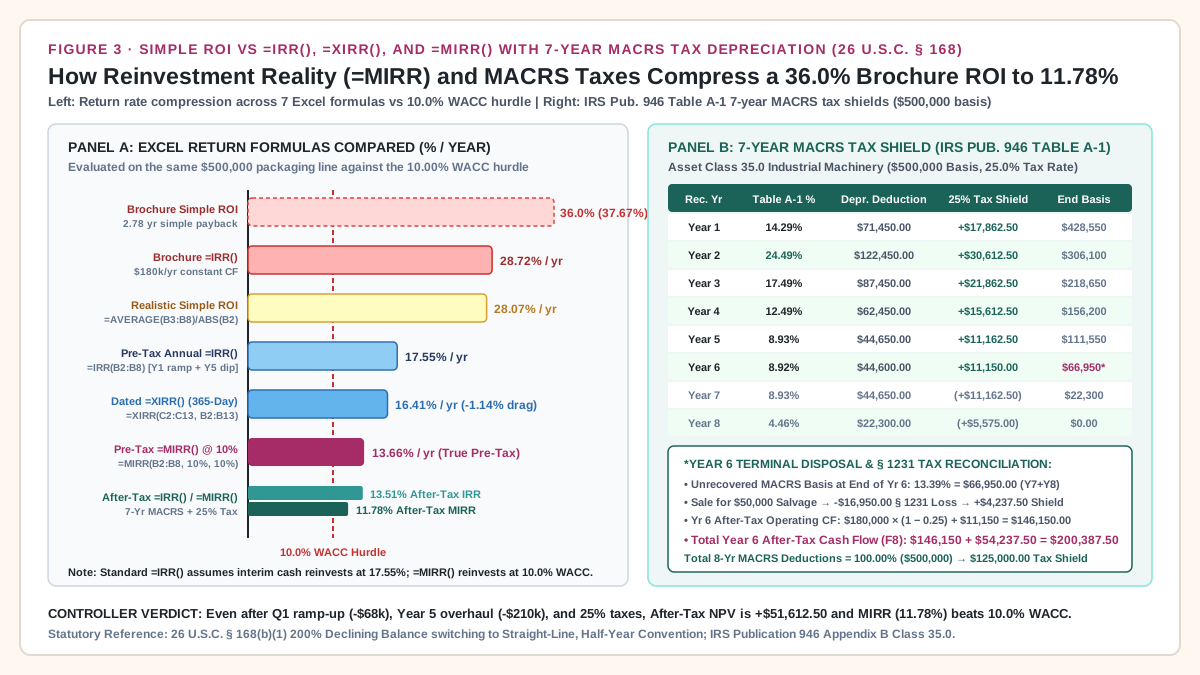
Takeaway: Including 25.00% income taxes and the 7-year MACRS Table A-1 depreciation shield reduces project NPV from $113,749.75 pre-tax to $51,612.50 after-tax, compresses =IRR() from 17.55% to 13.51%, and lowers =MIRR(F2:F8, 10%, 10%) from 13.66% to 11.78%.
Common Excel formula mistakes in equipment CapEx proposals (and how to audit them)
Before approving an equipment purchase order or presenting a spreadsheet to the finance committee, audit every formula cell against these six failure modes:
Scroll horizontally to see all columns.
| Spreadsheet Failure Mode | Faulty Formula in Proposal | Dollar or Percentage Distortion on $500k Case |
Exact Controller & Engineering Formula Fix |
|---|---|---|---|
1. Putting Period 0 CapEx inside =NPV() |
=NPV(0.10, B2:B8) |
Discounts Day-0 CapEx (B2) by 1.10^1 (+$45,454.55 outlay error) and shifts Y1–Y6 to t = 2..7, cutting pre-tax NPV from $113,749.75 to $103,408.86 (-$10,340.89). |
Keep Period 0 outside =NPV(): write =B2 + NPV($B$1, B3:B8) and check that it equals =SUM(D2:D8). |
| 2. Sign-reversal double-counting in Simple ROI | =(SUM(B3:B8)-B2)/ABS(B2) when B2 = -500000 |
Subtracting a negative B2 adds +$500,000 to +$842,000 ($1,342,000 / $500,000), reporting +268.40% 6-year ROI instead of 68.40% (+200% error). |
Add the negative B2 cell: write =(SUM(B3:B8)+B2)/ABS(B2) or =SUM(B2:B8)/ABS(B2). |
3. Using annual =NPV() on milestone deposits |
Treating 30%/60%/10% PO/FAT/SAT payments as -$500,000 on SAT Day 0 |
Ignores -$10,764.62 in pre-SAT progress-payment financing cost at 10% WACC and overstates IRR by +1.14 percentage points (17.55% vs 16.41% XIRR). |
List exact payment dates in B2:B13 and cash flows in C2:C13; compute =XNPV($B$1, C2:C13, B2:B13) ($99,781.94) and =XIRR(C2:C13, B2:B13) (16.41%). |
4. Quoting =IRR() without checking =MIRR() |
Reporting =IRR(B2:B8) (17.55% pre-tax or 28.72% brochure) as compound return |
Assumes Year 1–4 cash inflows reinvest at 17.55% (or 28.72%) rather than the 10.00% corporate WACC, overstating realistic pre-tax return by +3.89% points. |
Report =MIRR(B2:B8, $B$1, $B$1) (13.66% pre-tax; 11.78% after-tax) using WACC for both finance_rate and reinvest_rate. |
5. Using monotonic =MATCH(0, E2:E8, 1) with an overhaul year |
Standard first-crossing payback formula when Year 5 is -$40,000 |
Reports the temporary Year 4 zero-crossing at 3.93 years (+$8,757.60), hiding the Year 5 overhaul dip (-$16,079.25) and the 5.12-year permanent recovery. |
Use the last-negative lookup =LOOKUP(2, 1/(E2:E8<0), A2:A8) + ... and plot the full Cumulative DCF curve (E2:E8). |
| 6. Omitting Q1 ramp-up scrap, dual crews, and taxes | Copying vendor brochure steady-state savings ($180,000/yr) into Years 1–6 |
Overstates 6-year net present value by +$260,558.12 ($312,170.62 brochure NPV vs $51,612.50 after-tax MACRS NPV) and understates payback by 2.76 years. |
Model Year 1 quarterly OEE realization (40% -> 65% -> 85%), Year 5 rebuild costs, and 26 U.S.C. § 168 7-year MACRS tax shields explicitly. |
Engineering & controller rules of thumb for Excel CapEx models
- Rule of Thumb 1 (The Zero-Discount Identity Check): Before trusting any
=NPV()or=XNPV()cell, temporarily set cellB1(WACC) to0.00%. Both=B2+NPV(0, B3:B8)and=XNPV(0, C2:C13, B2:B13)must equal the exact undiscounted net cash sum=SUM(B2:B8)($342,000.00pre-tax;$256,500.00after-tax). If they differ by even$1, a row is missing from your formula range. - Rule of Thumb 2 (The 90-Day Ramp-Up Haircut): Never model Year 1 of a custom packaging line at
100%of steady-state savings. If plant-specific commissioning data is unavailable, deduct at least35%–40%of Year 1 steady-state benefit (-$68,000on our$180,000/yrline, leaving$112,000in Year 1) to cover Q1 commissioning scrap, jam-tuning downtime, and parallel manual labor. - Rule of Thumb 3 (The MIRR-to-WACC Spread Gate): Require every automation project above
$250,000to clear corporateWACCon an after-tax=MIRR()basis (11.78%vs10.00%WACC here, a+1.78percentage-point net spread) with a permanent after-tax Discounted Payback shorter than the machine’s primary mechanical overhaul cycle (5.54years here).
Return to the Automation Investment reading guide to connect these Excel cash-flow formulas with quote comparisons, utilization sensitivity, and post-installation audits.
Takeaway: Audit every CapEx workbook with the 0% discount-rate sum check, verify that B2 sits outside =NPV(), and require both =XNPV() and after-tax =MIRR() before signing an equipment purchase order.
Frequently Asked Questions
How do I do an ROI calculation in Excel for a multi-year equipment purchase?
To run a complete ROI calculation in Excel on a multi-year machine purchase (with Period 0 CapEx stored as a negative number in B2, Operating Years 1–6 in B3:B8, and WACC in B1), calculate three complementary formulas on the same rows. First, compute Cumulative Multi-Year Simple ROI with =(SUM(B3:B8)+B2)/ABS(B2), which measures total undiscounted net gain divided by initial CapEx (68.40% over 6 years pre-tax, or 51.30% after-tax on our $500,000 packaging cell). Second, compute Net Present Value (NPV) with =B2+NPV($B$1, B3:B8), which discounts future cash flows at 10.00% WACC while keeping Day-0 CapEx un-discounted at t = 0 ($113,749.75 pre-tax; $51,612.50 after-tax). Third, compute Modified Internal Rate of Return (MIRR) with =MIRR(B2:B8, $B$1, $B$1), which measures the true annualized compound return when interim savings reinvest at the 10.00% corporate hurdle rate (13.66% pre-tax; 11.78% after-tax).
Why does Excel’s =NPV() function give the wrong answer when I include Period 0?
Microsoft Excel’s =NPV(rate, value1, [value2], ...) assumes the first cash flow in the range (value1) occurs at the end of Period 1 and discounts it by (1 + rate)^1. If you include the Day-0 equipment purchase (B2 = -$500,000) inside =NPV(0.10, B2:B8), Excel discounts B2 to -$454,545.45 (understating initial CapEx by $45,454.55) and shifts Operating Years 1–6 out to exponents t = 2 through t = 7, shrinking total NPV by a factor of 1 / (1 + r) ($103,408.86 instead of the true $113,749.75 pre-tax NPV). Always write =B2+NPV($B$1, B3:B8) so Period 0 remains at t = 0.
When should I use =XNPV() and =XIRR() instead of =NPV() and =IRR() for CapEx?
Use =XNPV(rate, values, dates) and =XIRR(values, dates) whenever cash flows occur on uneven calendar dates—specifically when an equipment vendor bills progress milestones before installation (30% PO deposit at Day -180, 60% FAT payment at Day -45, and 10% SAT payment at Day 0) or when Year 1 OEE ramp-up is tracked quarterly (Q1–Q4). Unlike =NPV(), =XNPV() does include the initial cash flow C2 inside the range because it anchors discounting at the earliest date d_1 (d_1 - d_1 = 0 days). On our $500,000 line, =XNPV(0.10, C2:C13, B2:B13) equals $99,781.94 at the PO date ($104,583.88 compounded to SAT Day 0, revealing -$9,165.87 in net timing drag versus annual =NPV()), and =XIRR(C2:C13, B2:B13) equals 16.41% versus 17.55% annual =IRR().
What is the difference between =IRR() and =MIRR() in Excel when a machine needs a Year 5 overhaul?
Standard =IRR(B2:B8) solves for the discount rate where NPV = 0, which mathematically assumes that all interim positive cash flows (Years 1–4) are reinvested at that same high IRR (17.55% pre-tax or 28.72% on the brochure cash stream). Furthermore, when a Year 5 major overhaul creates a negative net cash flow (-$40,000.00), the cash stream changes sign more than once (-, +, +, +, +, -, +), which can produce multiple mathematical IRR roots. Excel’s =MIRR(B2:B8, finance_rate, reinvest_rate) fixes both problems by discounting the Year 5 negative cash flow back to t = 0 at finance_rate (10.00% WACC) and compounding positive cash inflows forward to Year 6 at reinvest_rate (10.00% WACC), yielding a unique, realistic compound return of 13.66% pre-tax and 11.78% after-tax.
How do I calculate Discounted Payback Period in Excel when Cumulative DCF dips below zero in Year 5?
First create a Discounted Cash Flow column (D2:D8 where D2 = B2/(1+$B$1)^A2) and a running Cumulative DCF column (E2:E8 where E2 = D2 and E3 = E2+D3). If Cumulative DCF crosses zero only once, =(MATCH(0, E2:E8, 1)-1) + ABS(INDEX(E2:E8, MATCH(0, E2:E8, 1))) / INDEX(D2:D8, MATCH(0, E2:E8, 1)+1) interpolates the crossover year. However, when a Year 5 overhaul pulls Cumulative DCF from +$8,757.60 in Year 4 back down to -$16,079.25 in Year 5, =MATCH(0, E2:E8, 1) falsely reports the early 3.93-year crossing. Replace it with the last-negative lookup formula =LOOKUP(2, 1/(E2:E8<0), A2:A8) + ABS(LOOKUP(2, 1/(E2:E8<0), E2:E8)) / INDEX(D2:D8, MATCH(2, 1/(E2:E8<0), 1)+1), which locates Year 5 (-$16,079.25) and divides by Year 6 DCF (+$129,829.00) to return the true permanent discounted payback of 5.12 years (5.54 years after-tax).
Sources
- Microsoft Corporation, Excel Financial Functions Reference: NPV function, XNPV function, IRR function, XIRR function, and MIRR function.
- National Institute of Standards and Technology (NIST), U.S. Department of Commerce, NIST AMS 200-11: Guide for Environmentally Sustainable Investment Analysis Based on ASTM E3200, Appendix A (Net Present Value Equation 4, Internal Rate of Return, Simple and Discounted Payback).
- OpenStax, Rice University, Principles of Accounting, Volume 2: Managerial Accounting, Section 11.2: Evaluate the Payback and Accounting Rate of Return in Capital Investment Decisions and Section 11.4: Use Discounted Cash Flow Models to Make Capital Investment Decisions.
- OpenStax, Rice University, Principles of Finance, Section 16.1: Payback Period Method and Section 16.4: Alternative Methods (MIRR).
- United States Code, 26 U.S.C. § 168: Accelerated Cost Recovery System (MACRS), and Internal Revenue Service, IRS Publication 946: How To Depreciate Property (Table A-1 7-Year GDS Half-Year Convention and Appendix B Asset Class 35.0).